10 copy-ready Airbnb welcome message templates for every guest and stage of the stay, plus when to send each and what to include.
Updated October 2026. Written and reviewed by the STR Market Superhost team.
A welcome message sets the tone for the whole stay. Guests who feel expected, know how to get in and can find the WiFi in ten seconds start relaxed. Guests who are hunting for a lockbox code in a long message thread start annoyed, and that mood often shows up in the review.
Below are Airbnb welcome message examples you can copy for every stage of the trip and every type of guest, what to include, when to send each one and how to show a personal welcome on the TV when guests walk in.
Keep each message short and focused on what the guest needs at that moment. Two to six sentences is plenty.
| Message | When to send | Main job |
|---|---|---|
| Booking thank-you | Within an hour of booking | Confirm and set expectations |
| Pre-arrival | 2 to 3 days before check-in | Address, parking, how to get in |
| Check-in day | Morning of arrival | Door code, WiFi, a warm hello |
| First morning check-in | The morning after arrival | Catch small problems before the review |
Airbnb's scheduled quick replies can send these automatically and fill in details such as the guest's first name, check-in time and WiFi password. A property management system or messaging tool can do the same across Airbnb, Vrbo and Booking.com.
Copy any template below, replace the bracketed details and save it as a scheduled message.
Hi [Guest first name], thank you for booking [Listing name]! We are excited to host you on [check-in date]. I will send check-in details [2 days] before you arrive. In the meantime, let me know if you have any questions or are celebrating something special.
Hi [Guest first name], your stay is almost here! A few details for [check-in date]:
Check-in: after [4pm]
Address: [address]
Parking: [driveway, space 2]
Entry: self check-in with the keypad. Your code will arrive on the morning of check-in.
The full house guide, including WiFi and house rules, is here: [guidebook link]. Safe travels!
Welcome, [Guest first name]! Your door code is [code] and the home is ready from [4pm]. WiFi: [network] / [password]. Everything else you need is in the guidebook and on the TV. Message me any time. Enjoy your stay!
Hi [Guest first name], welcome to [City]! The coffee shop two blocks north opens at 7am, and the beach path starts at the end of our street. Everything you need for the house is in the guidebook. Have an amazing stay.
Welcome, [Guest last name] family! The travel crib and high chair are set up, and extra blankets are in the hall closet. The playground across the street is a favorite with our younger guests. Let us know if you need anything at all.
Welcome, [Guest first name]. The desk is set up in the second bedroom with a monitor and fast WiFi ([network] / [password]). There is coffee in the kitchen and a printer at the library two blocks away. Wishing you a productive trip.
Happy [anniversary / birthday], [Guest first names]! We are so glad you chose our place to celebrate. Our favorite dinner spot nearby is [restaurant], and sunset from the deck is around [7:30pm]. Enjoy every minute.
Welcome, [Guest first name] and [Pet name]! Bowls and a dog bed are in the laundry room, and the fenced yard is all yours. The closest dog-friendly trail is [trail name], about [5] minutes away. Have a great stay, both of you.
Welcome home for the next [4 weeks], [Guest first name]! The washer and dryer are yours to use, and trash pickup is [Tuesday]. I will check in once a week, but message me any time something needs attention.
Good morning, [Guest first name]! Just checking that you settled in well and have everything you need. If anything is not right, tell me now and I will fix it today.

Chalkboards and printed signs are a nice touch, but they say the same thing to every guest and need updating by hand. A TV welcome screen can change for each booking.
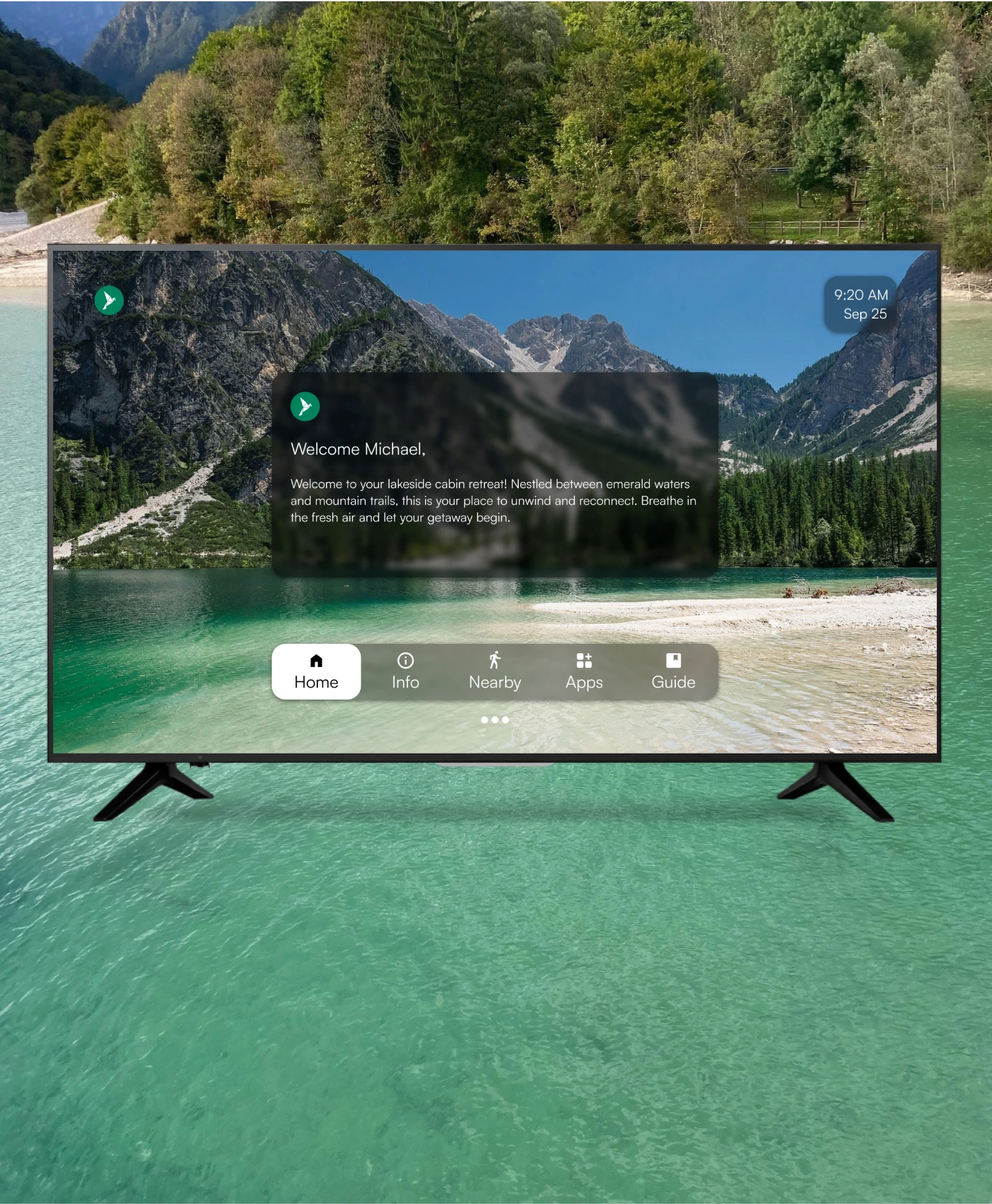
WelcomeScreen greets each guest by name on the TV and in a mobile guidebook, with WiFi, house rules and local tips. It runs on Fire TV, Google TV and Roku and syncs guest names from Airbnb and PMS platforms such as Hostaway, Guesty, Lodgify, OwnerRez, Beds24 and Hospitable. The TV App starts at $9.99 per listing per month, with a free trial. Disclosure: WelcomeScreen is STR Market's sister company.
Greet the guest by name, confirm check-in time and entry, share the WiFi, point them to your guidebook and tell them how to reach you. Add one local tip to make it personal.
Send a short thank-you right after booking, check-in details 2 to 3 days before arrival and the door code with a warm hello on the morning of check-in. A quick message the first morning helps catch problems early.
Yes. Airbnb's scheduled quick replies send messages before or after events such as check-in and checkout and fill in details like the guest's name and WiFi password. Most PMS and guest messaging tools do the same across every channel.
A handwritten note is a nice touch for special occasions. For everyday stays, a welcome on the TV or in a digital guidebook updates itself and keeps WiFi and house info in one place.
Use message details for the guest's name and dates, and connect a TV welcome screen or guidebook to your PMS so names fill in on their own for each booking.
Want to automate every message? Compare tools in our guest communication software rankings.
